# Créer un service

1. Depuis le logiciel **Sage direct**
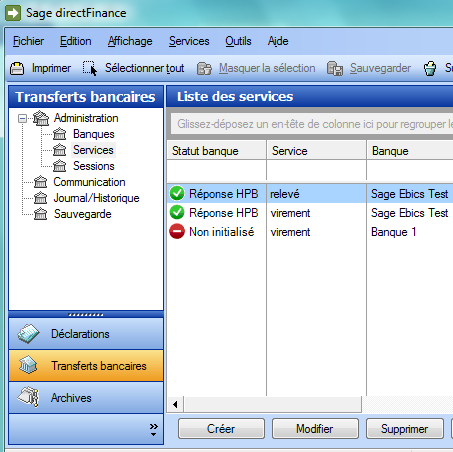
2. Accédez au menu : **Services&gt;Transferts bancaires &gt;Administration&gt;Services**

<span style="mso-ignore: vglayout; position: absolute; z-index: 251657728; margin-left: 161px; margin-top: 397px; width: 104px; height: 40px;">![](file:///C:/Users/maryline.letellier/AppData/Local/Packages/oice_16_974fa576_32c1d314_3ebe/AC/Temp/msohtmlclip1/01/clip_image001.png)</span><span style="mso-no-proof: yes;">![](https://wiki.ws.codasoft.fr/uploads/images/gallery/2025-09/embedded-image-kva2n0n1.png)</span>

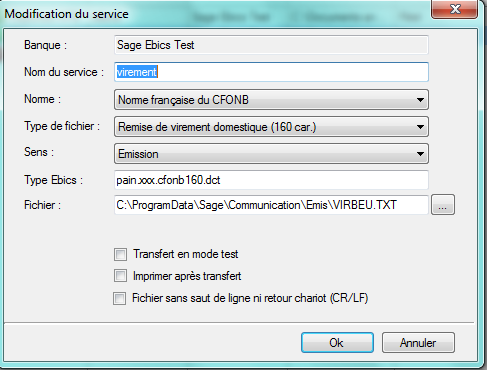
Le bouton **Créer** affiche la fenêtre "Définition du service"
<span style="mso-no-proof: yes;">![](https://wiki.ws.codasoft.fr/uploads/images/gallery/2025-09/embedded-image-0mujkosh.png)</span>

<span style="mso-no-proof: yes;">Faire attention au chemin du fichier et bien mettre \* avant le .TXT</span>